 Open Historia
National Statistics
The stat sheet: strategic indices, population, GDP and the rest — where the numbers come from and how to track them.
Every country has a stat sheet — relations, agreements and conflicts, then leader, government, stability, six strategic indices, population and a set of economic figures. Open it from the Stats tab of the advisor drawer (the Advisor button, bottom right). It has two tabs, 🤝 Diplomacy and 📈 Economy.
It retargets to whatever country you last clicked on the map, so it works as a dossier on anyone, not just yourself.
On beta the sheet has a panel of its own. Stats has left the advisor drawer. Your flag at the bottom right, above the advisor's button, opens the Country panel (on a phone, your country's name in the date pill does), and so does Stats on any country's card. It has four tabs — 🏛 Politics, 🤝 Diplomacy, 📈 Economy and 🏆 Ranking — and opens on Politics. Under the country's name it shows its tags and, once the game has ranked it, whether it is a Major power, Regional power or Minor power.
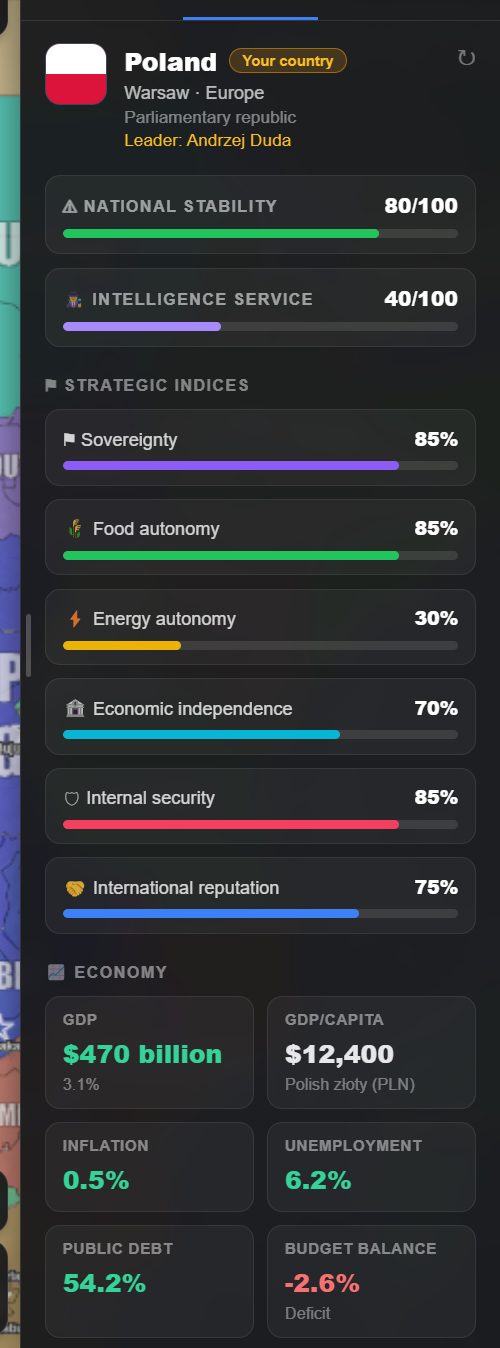 Poland's sheet. Note the intelligence service at 40 — the default for a country nobody has assessed.
National stability
A single 0–100 figure for how firmly the government holds the country together, with a colour band:
| Stability | |
|---|---|
| 70–100 | Green — solid |
| 40–69 | Amber — strained |
| Below 40 | Red — in trouble |
Stability is the number to watch when you are pushing your own country hard. Wars, austerity, purges and humiliations all cost it, and a country in the red is one where events start happening to the government rather than because of it.
Strategic indices
Six measures, each 0–100:
| Index | What it measures | |
|---|---|---|
| ⚑ | Sovereignty | How much the country actually decides for itself |
| 🌾 | Food autonomy | Whether it can feed itself |
| ⚡ | Energy autonomy | Whether it can power itself |
| 🏦 | Economic independence | How far it is at the mercy of others economically |
| 🛡 | Internal security | Control over its own territory and population |
| 🤝 | International reputation | How far it is trusted abroad |
These are the strategic picture in six numbers. A country with high GDP and low food and energy autonomy is rich and vulnerable; one with high internal security and low sovereignty is a well-run client state.
International reputation is not just a display value — it is a real world field that other countries respond to. See countries and identity.
Intelligence service
A separate 0–100 rating for the country's intelligence apparatus, shown on the same sheet. It is never written by the model as part of the economic figures. A service nobody has assessed reads 40, an ordinary one; opening a country's 📈 Economy tab asks for a first reading of it, as background AI, so only while Background AI is on (Settings → AI → AI requests).
After that it moves through events, and every time skip is shown your service's rating so that it can. The skip is told to raise it a few points at a time for what you ordered and the turn actually delivered — a training academy opening its doors, a new bureau standing up, a funding increase taking effect, a codebreaking programme bearing fruit — and to lower it for a purge, a mass defection, a network rolled up by a rival or deep cuts. An order only just given moves nothing, and no single measure is meant to jump it by tens of points.
It is the governing statistic for espionage, and worth raising deliberately before you start relying on agents.
Population and economy
| Field | |
|---|---|
| Population | Total population |
| GDP | With growth rate shown beneath |
| GDP per capita | With the country's currency |
| Inflation | |
| Unemployment | |
| Public debt | |
| Budget balance | Surplus or deficit |
Plus a GDP breakdown bar splitting output between agriculture, industry and services, validated to add up to 100.
Large numbers are displayed compactly — 30,000,000,000 shows as 30.0B — with the currency symbol preserved.
On beta, war moves these figures too. The men a country raises for a battlefield leave its population and those who come home are given back, so a war costs it the men who do not; and a blockade takes a share of its GDP and points off its budget balance. See men, money and military power.
Military power
Beta channel only.
Under the economy, the ⚔ Military card gives the country's Military power — what it weighs in a land war, counted from its people and what its forces have to spend, never from the land it holds — and the figures that power is read through, each as a bar out of 100:
| Figure | |
|---|---|
| Troop quality | How well its soldiers fight |
| Technology | What they fight with |
| Spending | What its forces have to spend, against other countries' |
| Manpower share | The share of its people who can be put under arms, in per cent (12 unless its scenario or the country itself says otherwise) |
| War weariness | How weary of war it is, in amber once it is weary at all |
| War resources | What it has left to fight with besides its men, where the scenario's wars use them |
| Land, Naval, Air | What it can do on land, at sea and in the air |
A figure in colour is the country's own, from its scenario or its sheet; one in grey is what every country has, which is 50 on the 0–100 figures. The thin mark on a bar is where every country stands. A scenario can switch countries' own figures off, and then the card says that every country fights with the same.
The figures are rated by the AI against every other country's, twenty countries to a request. A scenario's designer can rate them all at once and ship them with the scenario; a country nobody rated is rated the first time the game needs it — when its Military card is opened, when the ranking is by military power, or when it goes to war — as background AI.
How they move. Every time skip is shown your figures and those of the countries at war with you, and told to move them only by what happened. Training and exercises raise troop quality; modernising, research and new weapons raise technology; a bigger defence budget raises spending; conscription, mobilisation or a larger standing army raise manpower and land; new warships raise naval and new aircraft air. Heavy losses, purges, cuts, demobilisation and neglect lower them. It is told to size each change to what the period delivered: a month a point or two, a year of real effort several, a decade of determined rearmament twenty or more. An order only just given moves nothing yet.
What each figure does in a war is on men, money and military power.
There is no treasury
This is the important thing to understand about economics in Open Historia: the economy is a description, not a bank account.
There is no pot of money you spend, no per-turn income to allocate, and no build costs to pay. GDP, debt and budget balance describe your country's situation and inform how the world treats your decisions — a country with 140% public debt and a deficit will find an expensive rearmament programme going badly — but you never "afford" anything by clicking.
You change the economy the way a government does: by ordering policy and living with the consequences. See giving orders.
On beta, the economy pays for the war. Still nothing you spend by hand: what a country's forces have to spend is worked out from its GDP, more with a budget in surplus and less with a deficit or a heavy debt, and its economy refills the war resources its fortifications use up, less under a blockade. See war.
Where the numbers come from
Stat sheets are generated on demand for the country you are looking at, from the actual world state, and cached so that reopening the panel does not regenerate them. The ↻ control refreshes one; Shift+click rebuilds its baseline from scratch.
On beta, ↻ opens a choice. Refresh uses a request only if something has changed since the last assessment (on a scenario's own sheet, always one), and on the standard sheet Rebuild baseline from scratch uses one request to replace the numbers with a fresh assessment of the country as it stands, after you confirm it. Only the 📈 Economy tab builds a sheet the moment you open it; 🏛 Politics and 🤝 Diplomacy leave a missing one to background AI, and going down the 🏆 Ranking asks for nothing.
On a brand-new game the world is still writing its backstory for the first few moments. Open Stats then and the sheet waits for it — "Waiting for the world to finish updating, then compiling national statistics…" — rather than running a second AI call alongside it and describing a world with no history yet.
They then move through events. When a turn changes a country's circumstances, the event carries the statistical change with it — and only the fields that actually changed, so everything else keeps its previous value.
That includes who leads: a leader overthrown in an event has their successor written to the sheet in the same breath.
On beta, a scenario can say how many people a country begins with. In the Workshop's Countries panel, Population when the scenario begins sets the figure its troops are raised from and its statistics begin from. And every country you come into conflict with — on a battlefield with you, or in the path of a route you draw — has the figures a war reads of it (its people, GDP, budget balance and debt) worked out in one request for up to eight countries at a time, as background AI.
Reading someone else's
Click any country, open Stats. You get the same sheet for them.
Two caveats. What you see is the world's view of that country, not privileged information — for that you need espionage. And generating a sheet for a country you are interested in is itself the trigger that gets them an intelligence rating assessed, if they did not have one.
The Politics tab
Beta channel only.
🏛 Politics is the country's government as the world knows it: its form, its Head of state and Head of government, and the party or coalition in power. Beneath that, a ring shows its Political landscape, each party's support, or, where it is not governed through elections, its Power structure, who holds the influence. Clicking a slice opens that party or bloc: its leader, its public priorities and its foreign-policy outlook. Then its National priorities, the Institutions it belongs to, and whatever your agents have reported of its politics.
Where groups are on, it also lists the groups holding ground on the country's territory; a row flies the map to the area it controls.
The Ranking tab
Beta channel only.
🏆 Ranking sets the countries of the game side by side by one figure at a time: Population, Economy, Wealth per person, Military power, Land held, Stability, Reputation, and War weariness once anyone is weary. A scenario with a sheet of its own ranks by its own values instead, beside military power, land, reputation and weariness.
Each row has the country's rank, flag and figure, with your own country outlined; click a row and the panel turns to that country. The first 25 are shown, and Show every country lists the rest.
A figure that comes from a stat sheet only covers the countries that have one — your own, those you track, those you have opened, those you came into conflict with. The rest are left out, and the tab says how many, rather than ranking a guess. Ranking by military power has the AI rate the countries nobody has rated yet.
A record, not a snapshot
The sheet can keep a history, so it is a record of the campaign rather than a snapshot. Everything above is under 📈 Economy; 🤝 Diplomacy is below.
Tracked history
The sheet re-generates itself as the campaign runs, so you can watch a country's debt climb or its energy autonomy recover across a decade instead of re-reading a number. Historical tracking, at the foot of the Economy tab, sets it up.
| Refresh interval | Manual only, or every 3, 6, 12 or 24 months of game time |
| Countries tracked at once | 8 |
| History kept | Up to 1200 samples |
Your own country is always included once an interval is set. Everything else you add yourself from the tracked-countries list; there is a ✕ on each to stop tracking it again.
On beta, tracking is on from the start. A game tracks your country every 6 months unless you turn it off, and asks for its first sheet after a time skip if it has none yet. Refresh status says when each tracked country was last refreshed, and Assess now builds the first sheet of one that has none, which the automatic refresh otherwise skips.
Advanced Statistics
Once there is history to draw, Advanced statistics at the foot of the Economy tab opens a full-screen chart over it. Pick a metric and it plots every snapshot taken, dated in game time:
| Group | Metrics |
|---|---|
| Headline economy | GDP · GDP per capita · Population |
| Economic conditions | GDP growth · Inflation · Unemployment · Public debt · Budget balance |
| Strategic indices | National stability, and all six indices above |
| GDP sectors | Agriculture · Industry · Services, as a share of GDP |
A scenario with a sheet of its own charts its own sections and values instead.
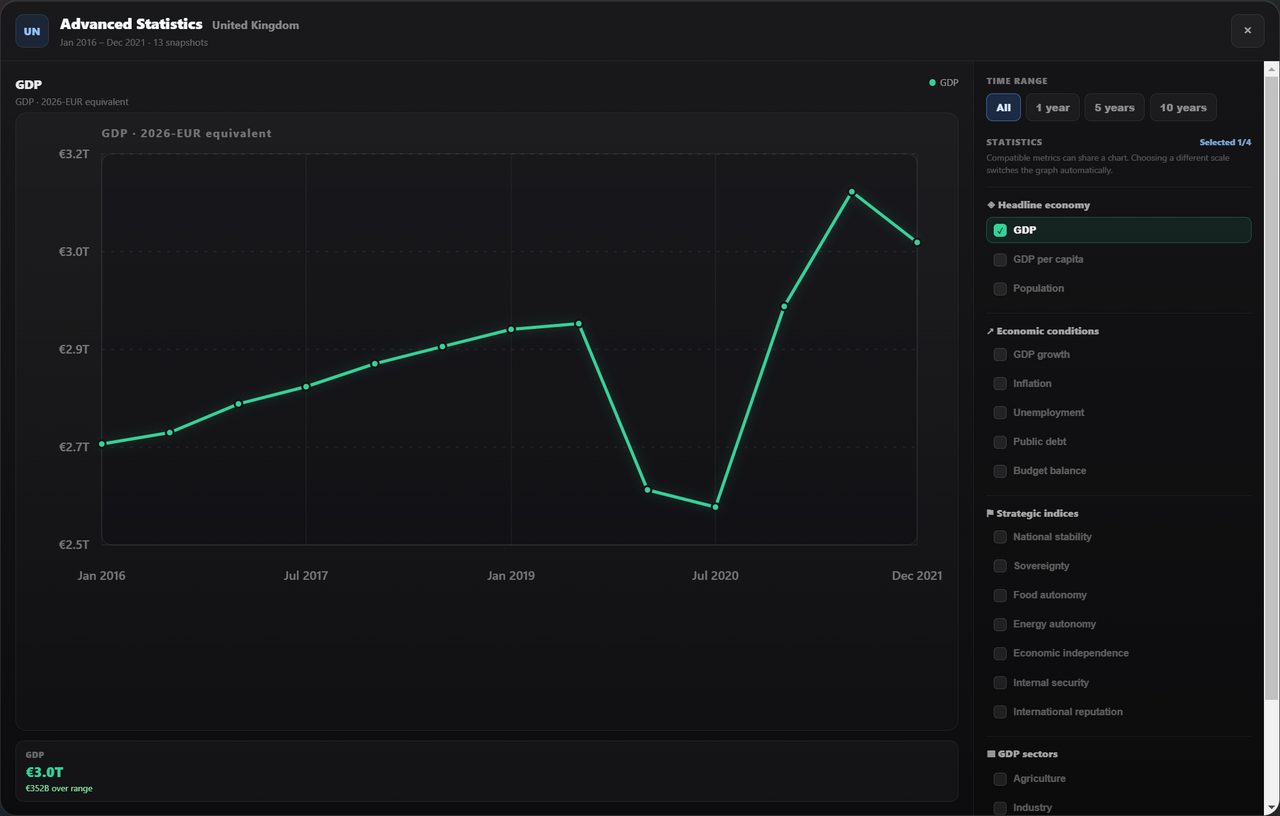 Six years of British GDP, with the 2020 collapse and the rebound. The range buttons narrow it to
the last year, five or ten.
You can put up to four metrics on one chart, as long as they share a scale — tick a metric on a different scale and the chart switches to it rather than drawing a meaningless second axis. The range buttons across the top limit it to the last 1, 5 or 10 years of game time.
Money is charted in a 2026-EUR equivalent so that countries with different currencies can be compared on one axis. Ancient scenarios chart correctly too — BC dates run backwards through the missing year zero, so a campaign starting in 218 BC plots in the right order.
The diplomacy block
Every sheet carries a 🤝 Diplomacy section, which is where the relation ledgers actually become visible. Three counts across the top — relations, active agreements, conflicts — and then the detail:
Bilateral relations. Every tracked relationship this country has, scored −100 to +100, each with a one-line summary, a meter, and a badge the game derives from the score — friendly, cordial, neutral, cautious, strained, hostile or rival. This is the single most useful screen in the game for working out who someone's real friends are before you approach them.
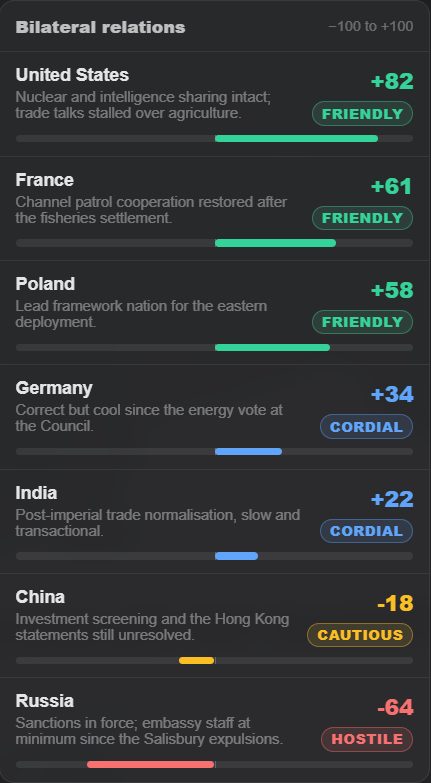 The United Kingdom's relations, sorted best to worst. The summary line is why the number is
what it is.
Formal agreements and current conflicts follow underneath: the treaty register with each agreement's type, parties, status and the date it last changed, and then who this country is currently fighting, taken from the war ledger.
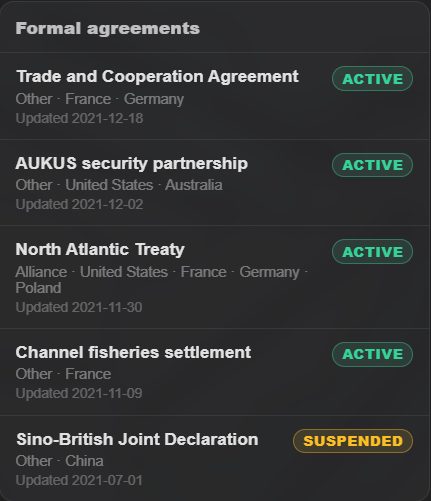 Agreements are listed active first. A suspended treaty stays on the register rather than
disappearing — the relationship still has a history.
An empty list means no record exists, which is not the same as neutrality — a pair of countries that have never interacted simply has nothing written down yet.
On beta the block says more. A Subordination card says what you know of a puppet arrangement the country is part of, and an overlord's Subordinate states are listed with their kind. Each conflict says who is fighting alongside, why it began, and links to See how it began on the timeline; it shows each side's war weariness and, in a war of your own, Propose peace. Below them, War reports keeps the after-action report of each of your wars fought out on a battlefield, with Read the report. See war.
Territory, overseas and landless
Countries with overseas territories get a per-capita figure twice: for the core and integrated territory, and for the whole polity including dependencies. The two can differ sharply, and the sheet shows both rather than picking one.
Landless polities work. A government-in-exile, a rebel movement or an organisation with no mapped territory gets a valid sheet.
Population follows the land. When territory changes hands, its people and economy go with it, so the game keeps track of how much of a country sits in each piece of its territory. For a country with up to 24 such pieces, the model estimates that split once, from where people actually live, never from how many map regions or how much area a piece covers. The game checks the answer and keeps it, asking again only when a piece changes size. Sprawling historical empires are split by the game's own weights instead. A piece of territory also keeps its own income level, so Puerto Rico is not credited with mainland American productivity. And a country holding part of another's land is assessed on that part only: Russia holding Crimea is not handed the whole of Ukraine's population.
Scenario stat sheets
The standard sheet is written for the modern world. A scenario can replace it entirely: in the scenario editor's Stats tab, under National Stats, Customize full sheet turns the standard layout into the scenario's own — sections and statistics you can rename, reorder, delete or add, each with a type (number, percentage, currency/value), a unit, a range, decimals, an icon, a colour and a line of AI guidance on what the value means in this world and what kinds of events should move it. A Bronze Age scenario can track grain stores and chariots instead of GDP and unemployment. The sheet is scenario data, so it travels with exports; Use standard sheet goes back. Its Economy tab is then called 📊 National.
On beta, a scenario's own sheet keeps a second layer. Under the values its players see, every country also carries the four figures a war reads — its people, GDP, budget balance and public debt — written in the same request as the sheet and moved by the same time skips, so its troops have people to be raised from. Its players never see them. The intelligence service and the ⚔ Military card show on such a sheet too.
On beta the advisor reads your stat sheet — and the world's war, relation and treaty ledgers — so it can answer about your figures rather than estimating them.
Next
- Countries and identity — reputation, tags and leaders.
- The advisor — asking someone to interpret all this for you.
- Espionage — the intelligence rating in practice.
- Military — what the military figures do in a war.
Open Historia is under active development on two channels, and this
wiki is written by hand — a page can fall behind a release. Last checked against the game on 2026-10-25 · main 6e6239c4 · beta d7e8fa85. If something
here does not match what you see in the game, trust the game and
say so on Discord.