 Open Historia
The Community Hub
Download scenarios other players have made, suggest changes to them, and publish your own.
The Community Hub is where scenarios are shared. It is the Community tab of the main menu, and it is where every scenario except Modern Day comes from — including the official presets.
You will also see it called the Scenario Hub; they are the same thing.
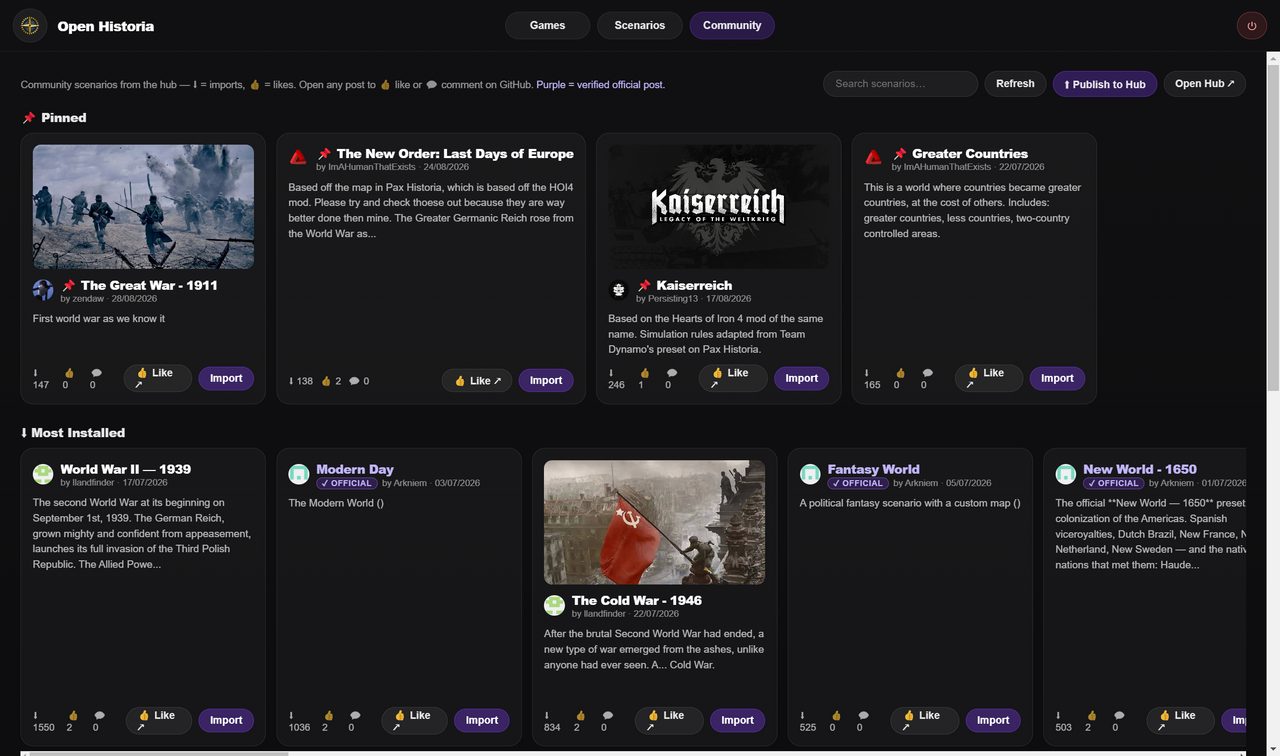 The hub's shelves. Install counts and likes are real, and a ✓ Official badge marks a verified official post.
Browsing
The tab opens with a 📌 Pinned shelf: the scenarios the hub's maintainers have chosen to feature. Only hub collaborators can pin something, so this shelf is curated rather than gamed. Below it, the whole hub in three rows:
- ⬇ Most Installed — by real install counts.
- 👍 Most Liked — by 👍 reactions on the post.
- 🕐 Most Recent — newest first.
The search box above them looks through titles, descriptions and authors.
On beta the shelf is called 📌 Featured, and everything else is one Browse Community grid you sort with Most Installed, Most Liked or Newest. Beside the search box, Start date takes a From and a To — a year such as 1914 or 218 BC, or a full date — and shows only the scenarios that begin between the two; Clear empties both. A scenario whose start date the hub does not know drops out while either box is filled. Each card also says what your library already holds of it — In your library, Update available or Edited copy in your library — and its button asks again before importing a second copy.
A scenario with a ✓ Official badge was posted by a member of the Open Historia team — verified by GitHub, from who posted it, not by what the title says. Anything without one is community work, which is most of the hub and where the more inventive scenarios tend to be. Only posts whose file the hub has checked are listed at all (see below).
Click any scenario for its detail view: description, cover image, counts, and ▶ Import & Play. Likes and comments live on the scenario's GitHub post; 👍 Like ↗ opens it.
The official presets
| Scenario | Start |
|---|---|
| Rome | 117 AD |
| Medieval | 1200 AD |
| Mongol World | 1300 AD |
| New World | 1650 |
| Bronze Age | 1200 BC |
That list is not exhaustive — Modern Day, a Fantasy World preset and other scenarios the team has posted carry the official badge as well, and the pinned shelf changes as new work is featured. Treat the hub itself as the authority rather than this table.
All one click to import.
Importing
Import & Play downloads the hub's checked copy of the scenario, installs it into your library and takes you to it in your Scenarios tab, where New Game starts it. Import on a card does the same without leaving the hub. From then on it behaves exactly like a built-in scenario — it is yours, it works offline, and you can edit or clone it.
On beta, Import & Play goes straight on to choosing your country, and a scenario already in your library offers ▶ Play your copy instead. A scenario made on a detailed map names that map rather than carrying it: in the desktop app, the last step of installing it offers the map's download, with its size.
A bundle carries the map, cities, colours, flags and any custom basemap the author used — including a map uploaded as a tile archive rather than drawn in the editor — so what you get is what they built. A game you start from an imported scenario remembers where it came from, so exporting that game later does not carry the map inside it: the receiver can fetch it from the hub.
Updates
If an author ships a newer version of a scenario you imported, its card in your Scenarios tab shows ⬆ Update in place of New Game.
Updating replaces the scenario in place. Games already running on the old version keep working — a game is a copy taken at the moment you started it, so it is not disturbed.
A scenario you imported with a version of the game from before October 2026 asks for an update as well, with a note on its card saying why. The hub now checks every file before the game will download it, and a copy from before that was never checked: updating swaps it for the hub's checked copy. If you have edited that scenario the game asks first, because updating replaces your changes — clone the scenario beforehand if you want to keep them.
Suggesting changes
Improved a scenario you downloaded from the hub? Send your changes to its author, who accepts or rejects each one, like tracked changes.
- Open the scenario from your Scenarios tab with Edit. Once you have changed and saved your copy, Suggest changes compares it with the post's and lists what changed, outside the map and on it. Add your name and a note for the author if you like.
- Save the file and open the post saves a small file of just those changes and opens the scenario's post with your comment ready to paste. Drag the file into the comment and click Comment.
- The author's game finds the suggestion on their post, once the hub has checked it, and their scenario's Community card offers Review. Changes outside the map are accepted or rejected one by one, or with Accept all and Reject all; changes on the map open in the map editor, listed beside the map and marked on it. Reject all from @… puts away everything one person suggested, on all of that author's posts.
Changes you suggest are released under CC BY 4.0, like the scenario they are for.
Unlink from the community post makes a downloaded scenario your own: it stops following the post, and you can no longer suggest changes to it.
On beta, unlinking is for good: a scenario cannot be linked to a post again. An author who stops looking for suggestions on a post cannot link it back either; publishing the scenario again makes a new post.
Publishing your own
Everything you publish is released under CC BY 4.0. Every scenario made in Open Historia that is posted or shared in any way is released under the Creative Commons Attribution 4.0 International licence, and that cannot be taken back. The same goes for changes you suggest to somebody else's scenario. Only publish what you made yourself, or what you may share under this licence. The game says so before you publish, the post form asks you to confirm it, and the exported file carries it.
Build a scenario in the map editor, then press ⬆ Publish to Hub in the Community tab and pick it. The game saves the scenario as a .zip — and its cover image beside it, since GitHub cannot show a picture from inside a zip — and opens the hub's post form with the details filled in. Drag both files into the Description box, tick the licence box, and submit. If the post form did not open, Open the GitHub post ↗ opens it.
On beta the game warns when the file is too large for GitHub, which takes attachments of up to 25 MB. Imported regions are the usual cause: in the map editor, select the scenario's most detailed regions, press Simplify, save, and publish again.
Some things worth doing before you publish:
- Write the description properly. It is what people read on the card.
- Set a cover image. Scenarios without one get skipped.
- Fill in the World Before Round One briefing. It is what stops a campaign on your map feeling like the world began at turn one.
- Set the deployable troop types. No air force in 1200 AD.
- Consider the Simulation Rules field. House rules injected into the world's instructions are what make an alternate-history scenario actually behave like its premise.
Basemaps and flags
The hub carries more than scenarios. Basemaps are posted separately and appear in the editor's Community tab, and flag packs can be shared and installed the same way. A scenario bundle can also carry its own basemap.
On beta the hub also holds music and detailed maps. A scenario's Music tab picks the tracks it plays as it opens, in play, at war and in the War Room from the hub's music list, which only the hub's contributors can add to. Detailed maps — large terrain maps for the desktop app — are posted on the hub too and checked like every other file.
How it works underneath
The hub is a GitHub repository — Open-Historia/Open-historia-scenarios — where every issue is
a posted scenario. Likes are GitHub reactions; the pinned shelf is a label only collaborators can
apply.
Every file posted to the hub is checked before the game will touch it. A post shows up in the game once its file has passed and the hub has released a checked copy of it — usually a minute or two after it is posted — and a file that fails is refused with a comment on the post saying why. The game downloads only those checked copies, and shows a post's pictures from them too. Once a post's file is released the hub closes the post, so in a web browser the released scenarios are under the repository's closed issues.
The list itself comes from one small index the hub publishes, not from GitHub's API, so browsing the tab costs none of the hourly allowance GitHub gives each player. The game keeps that index for five minutes, so a brand-new post may take a moment to appear; if the index cannot be read, the tab says the hub's list cannot be read yet rather than showing anything unchecked.
Install counts are GitHub's own: how many times a scenario's checked file has been downloaded from the hub. They count downloads rather than people, and the game reports nothing itself.
Because it is GitHub, you can browse the hub in a web browser, and a scenario you cannot reach in-game can always be downloaded from the repository directly and imported with the library's Import button.
Next
- The map editor — building something worth publishing.
- Starting a game — playing what you imported.
- Saves and rollback — importing and exporting by hand.
Open Historia is under active development on two channels, and this
wiki is written by hand — a page can fall behind a release. Last checked against the game on 2026-10-25 · main 6e6239c4 · beta d7e8fa85. If something
here does not match what you see in the game, trust the game and
say so on Discord.